
Project Summary
As part of Avon Library’s response to rapidly-changing needs during Covid, I redesigned technology services and the website homepage based on user needs to prioritize clear communication and internet and computer access.
DELIVERABLES
- User Research (survey, data analytics, service statistics)
- User journey map
- New technology services
- Iterative website homepage design
- UX writing
The Problem
Avon Free Public Library serves a small town in CT with a 30-person staff. As a valued part of the community, people count on the library for reliable information and access.
When Covid shut down the Library in March 2020, we needed to transform in-person services to get through the pandemic.
Services had to be turned inside-out and online for safety and accessibility. To do that, we:
- quickly identified and prioritized needs
- launched new safe and reliable services despite uncertain conditions
- communicated changes and current status clearly

My Role
As part of a management team of 5,
I strategized, prioritized, and launched services in coordination with key partners for greater support, consistency, and reach.

As Technology & Technical Services Manager of a team of 3,
I focused on challenges related to technology access and website communication.
- Conducted qualitative and quantitative user research through a survey and website/data analytics
- Redesigned website homepage and content strategy
- My team launched remote tech help, adapted computer and wifi access, and added new digital collections.
- My team also supported the remote technology needs of staff through Slack, Zoom, and Google Workplace as we worked together remotely for the first time.
Timeline of Services I Designed
Library Closes to the Public
Management team starts planning remote services
Outdoor Wifi Added
Available 24/7 as a base level of access
User Survey
Quick feedback to find out what users need
Website, v.1
Remote service, grouped by activity
Remote Printing
Printing from any device for curbside pickup
Computer Access
Computer users are the first public in the building in 4 months
Website, v.2
Services reorganized by mode of delivery as options expand
Covid Cases Surge Locally
Some local libraries cut back services, but we are able to remain open.
Website, v.3
Services summarized in a simple table
Jump to a section:
- User Research and Discovery
- Providing Connectivity and Computer Access
- Communicating Changing Services on the Website
User Research and Discovery
PROBLEM: In March 2020, we could no longer expect that we still know what our users needed.
SOLUTION: Find out what library patrons needed right then, even if we couldn’t provide it yet.
We started by acknowledging that everything was uncertain. At times, we couldn’t plan much further than one week out, and we expected users’ needs were changing just as rapidly.
We sent out a Google Survey nine days after closing to the public as a remote solution for quick feedback.
The team debated whether to include options for services that were impossible to deliver at that time, and we decided we needed to know what people were looking for so we could work on possible solutions.

Survey Results
March 25 – April 8
107 Survey responses from library patrons highlighted our priorities
THE NEED TO READ
Patrons really wanted eBooks and streaming video (46%), BUT they wanted a way to get print books and DVDs just as much (47%).
STORYTIME
Parents were looking for stories and projects for their kids. (21%)
TECH HELPLESS
People needed help getting started with Zoom and other remote tools (15%).
BOOK TALKING
Only a small number of people wanted online programs at first (9%).*
*Rapid changes: The demand for online programs changed so quickly that within 4 weeks of the survey, the library had already hosted 35 programs for 480 attendees.
Who is not represented?
Those who needed wifi (5%) or access to computers (3%) were underrepresented by the very nature of an online survey. We knew there was a segment of users who previously used the library every day for connectivity, and they would arguably be the most severely impacted by the shut down.
56% of respondents left additional comments

I categorized the open-ended responses and tallied them with the structured responses, adding new categories as needed.
This showed 2 more things we could work on…
- How do we offer a personal connection online?
“Could we possibly use Zoom for discussions, perhaps lectures, movies? I miss all the terrific programming Avon Library offers.” - How do we clearly show current available services as things keep changing?
“I didn’t know we could download movies–thanks for the reminder”
…and one that would, unfortunately, have to wait a while.
- “A quiet place to study :(”
Additional User Feedback
- As we implemented each new service, we had a soft rollout where possible to test the process with a handful of users.
- Remote Tech Help appointments by phone, email, or video chat provided one-on-one help and a way for users who are less tech-savvy and connected to share their concerns.
- Staff feedback was also important, because they were in the vulnerable position of interacting with the public, and we needed them to feel safe in order to make these services successful.

Providing Connectivity and Computer Access
PROBLEM: Some users rely on the Library for computer and internet access. While the Library is closed, they have few options.
SOLUTION: Provide access as soon as is safely possible, beginning with wifi access outdoors.
Outdoor Wifi
Mar 2020
The first thing that I could do, even before staff were regularly back in the building, was to relocate wifi access points so people with a device who just needed a stable internet connection could get better signal outdoors.
I also removed the requirement for a library card or guest pass so that the network was open to anyone who needed it.
Would people use it? Would it cause people to gather unsafely?
We saw people outside on their devices, but never more that 2 or 3 at a time, so it seemed to be working.
People could sit outside or stay in their car and still get signal.

Getting the word out offline
March – December 2020
Particularly for users who relied on us for internet and computer access, offering access was not enough.
We needed low tech ways to communicate offline.
- As we added services over the next several months, I designed signs for the front door, highlighting key services with phone numbers and QR codes for more information.
- A sidewalk sign by the road announced services for anyone passing by.
- The Library Director coordinated services with Town Hall and the Senior Center to share updates through their channels as well.

users know where to wait
and how to make
an appointment

reaches users as they drive by
on a main road
Remote Printing: Layering service on top of service to expand access
July 2020
We knew patrons were requesting a way to get books and DVDs in the survey, and outdoor wifi was working out. So once safety precautions were in place for limited staff to safely return to the building, the Circulation Department launched Curbside Pickup in May, which quickly became popular.
“Curbside pickup is the thing I never knew I needed.” – Library Patron
In response to requests to access a printer, my team set up Print From Anywhere in– a way to send a document from any device anywhere to a library printer, pay online, and pick it up curbside in July.
We coordinated curbside pickup with front-end staff, and used a Princh, a cloud-printing platform, to handle the technical part.
Patrons were able to print easily – almost too easily. One user discovered us on Google, and found out the hard way that this Avon Library was in Connecticut, not her town in Indiana when she tried to pick up her print job. (We added some more references to Avon, CT on the service webpage to clarify.)


Town newsletters
Computer Access: Guiding users through the first in-person service in 4 months
July 2020
With remote printing underway, we prepared to use that same process for cashless printing inside the library, but it was a challenge.
People who rely on library computers are frequent library users. What habits must we now break for this new process to work?
- New printing procedure for cashless printing
- Time limits and reservations users never had before
- New safety protocols to get used to
What does the user need to know? At what point?
- To prevent confusion, I created a User Journey Map by physically moving through the library as a patron would.


Mapping out the user journey helped us get people back in the building and using computers, but even among this relatively consistent group of regulars, habits and expectations continued to shift.
For example, in August, users were pleased to see cashless payments for printing set as the default, even though it took an extra step to complete. By October, more pre-pandemic computer users had returned, and they were frustrated that cash was not the default option, as it had been before, because that was what they preferred to use.
This shift in expectations and usage was a good reminder that more frequent user research would help us stay in sync with library users.
Communicating Changing Services on the Website
PROBLEM: Conditions changed quickly, and users couldn’t keep track of what was available.
SOLUTION: Create a centralized place on the website for users to see what is available and how to access it.
Wireframe
- Based on feedback from the survey, I redesigned the above the fold banner on the homepage as a single launchpoint for online collections and services in April.
- A Figma wireframe helped the management team to see how services were organized by categories drawn from survey responses.
- Resources that needed a library card were divided into steps with simple, concrete actions so users could see what they needed and how to get it.

Website v.1: Services were grouped by activity for easy remote access
Apr 2020
- We knew we needed to create this quickly, but we didn’t know how long this change needed to last.
- By using a readily available accordion-style plugin, a lot of info could be organized in a small area and styled to match the website quickly.
- Headings, steps, and links use friendly, plain language text to help the user understand their options.
- Hybrid services like curbside pickup and computer appointments were added as services expanded, making it difficult to highlight new additions and maintain consistent navigation.
As a single launchpoint, we could prioritize this space for the most up-to-date information and update other parts of the website as needed.


headings and content changed to accommodate them.
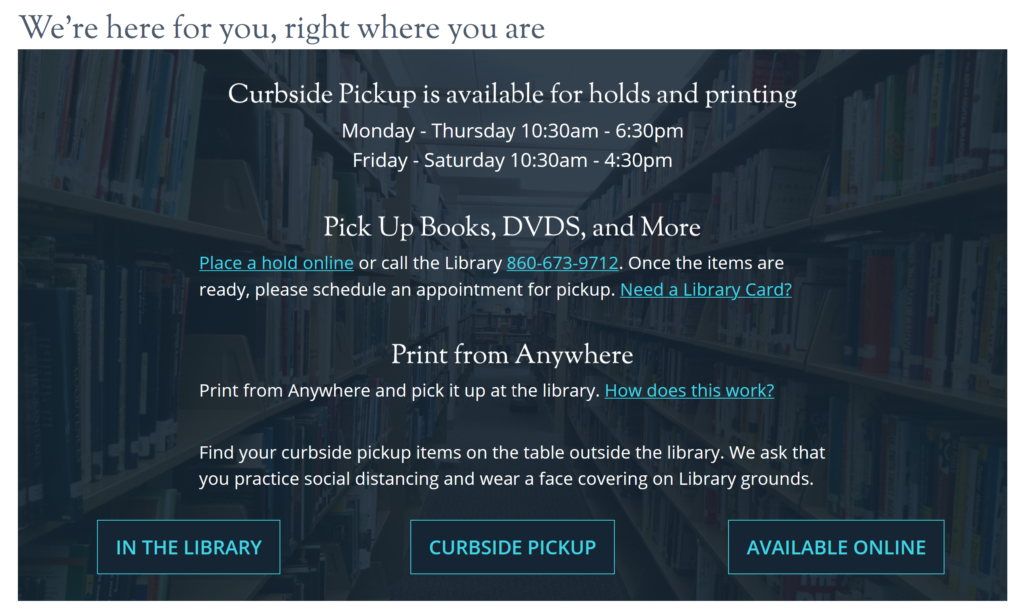
Website v.2: As services expanded, we reorganized by how users could interact with them
Sep 2020
- IN THE LIBRARY
- CURBSIDE PICKUP
- AVAILABLE ONLINE
- Reorganizing by mode of delivery made the navigation on the banner more concrete than the changing categories of activity in version 1.
- Because there were now only 3 screens, I changed this version to a carousel with buttons to be more consistent with design patterns on the rest of the site.
- (The previous accordion format was also being deprecated, and we would need this banner longer than we had anticipated.)
- The background image of library shelves reflects coming in for newly available browsing hours, but not sitting and congregating.

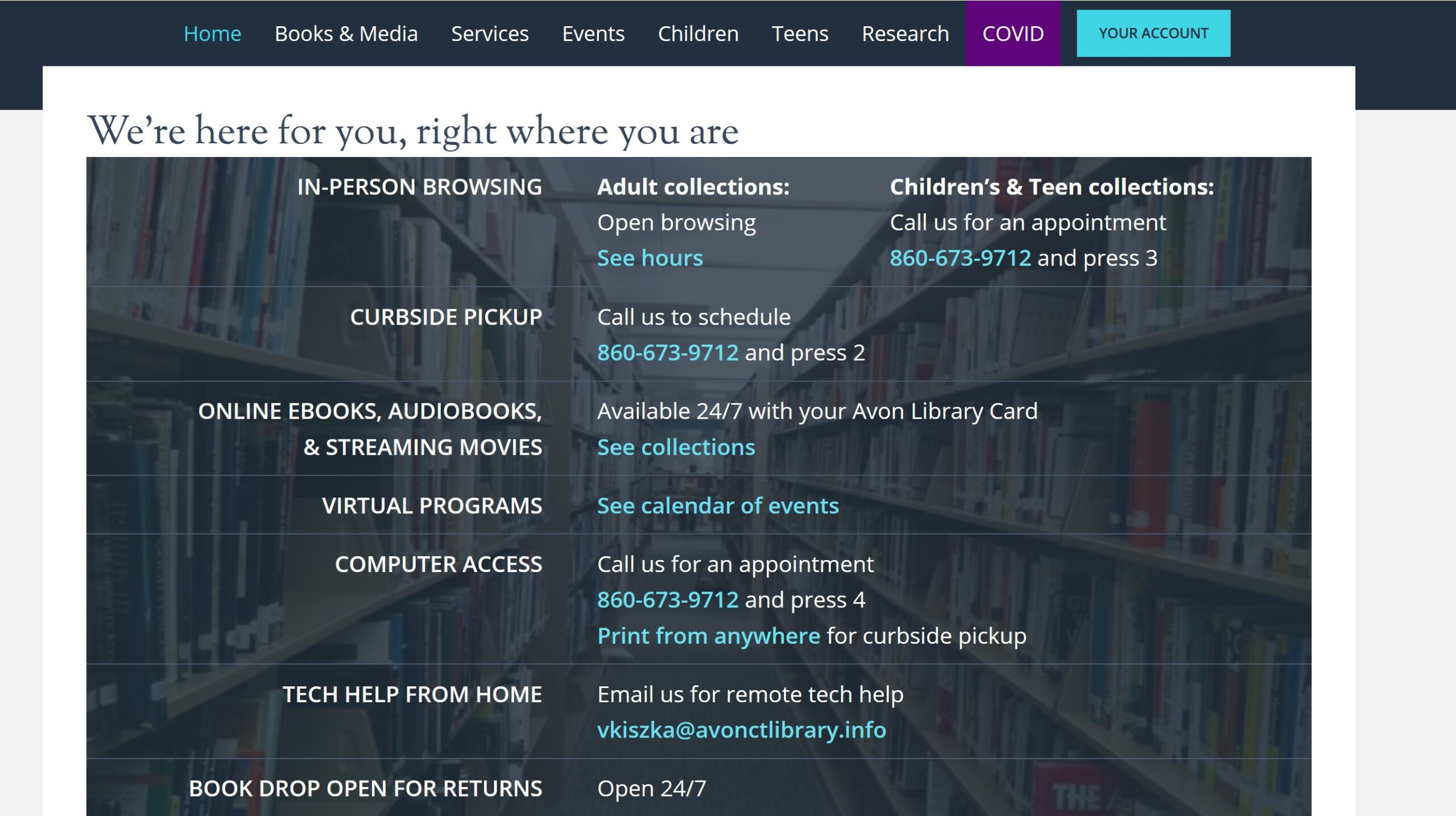
Website v.3: A responsive table for at-a-glance information
Dec 2020
After 8 months, users were more familiar with how to use library services, so we shortened the accompanying text to fit everything in a single table.
- All services were visible on the home screen, reducing complexity and navigation.
- Users commented that they liked how easy it was to see everything at once.
- This also improved accessibility for screen readers and WCAG compliance.
- A bar at the top of the website announcing limited services felt redundant, so this was moved to the main navigation, further simplifying the layout.
about a particular service.

A shift had occurred. The pace of change had slowed, and people no longer needed to be oriented to pandemic services.
While users worried if there would be roll backs in services due to a spike in Covid cases in the short term, they were looking forward, and more people began asking about future stages of reopening.
This third website version presents a dashboard view for people to see changes to come.
Outcomes
- As Avon library pivoted to remote and hybrid services during the pandemic, I created a library services communication hub on the website homepage to make it easy for patrons to know what services were available and how to access them.
- I redesigned wifi and printing for access outside of the library, and set up a safe process to restore public computer access in the library.
- Despite continuing uncertainty, we were able to maintain the same level of service when Covid numbers rose. And the Library even loaned more books and resources in December 2020 than in the previous year when full services were available.
What would I have done differently?
- We gathered user research and feedback where we could, but rapidly changing needs and opinions highlighted the necessity for more frequent user feedback.
- In response, my coworker and I began a user research program in December 2020 for more input.
